Installing a CMM (Coordinate Measuring Machine) holding fixture is a crucial step in ensuring accurate and efficient measurement processes. As a supplier of CMM holding fixtures, I understand the importance of providing clear guidance on installation to our customers. In this blog post, I will walk you through the process of installing a CMM holding fixture, highlighting key considerations and best practices along the way.
Understanding the CMM Holding Fixture
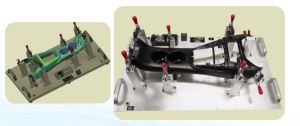
Before diving into the installation process, it's essential to have a clear understanding of what a CMM holding fixture is and its role in the measurement process. A CMM holding fixture is a specialized device designed to securely hold a workpiece in place during measurement using a CMM. It ensures that the workpiece remains stable and in the correct position, allowing for precise and repeatable measurements.
CMM holding fixtures come in various shapes, sizes, and configurations to accommodate different types of workpieces and measurement requirements. They can be made from a variety of materials, including metal, plastic, and composite materials, depending on the specific application.
Pre-Installation Preparation
Proper preparation is key to a successful installation of a CMM holding fixture. Here are some important steps to take before starting the installation process:
1. Review the Fixture Design and Specifications
Carefully review the design and specifications of the CMM holding fixture provided by the manufacturer. This will help you understand the fixture's features, dimensions, and compatibility with your CMM and workpiece. Pay attention to any specific installation instructions or requirements mentioned in the documentation.
2. Gather the Necessary Tools and Equipment
Make sure you have all the tools and equipment required for the installation process. This may include wrenches, screwdrivers, Allen keys, measuring tapes, and other specialized tools depending on the fixture design. Having the right tools on hand will ensure a smooth and efficient installation.
3. Clean and Prepare the CMM Work Surface
Thoroughly clean the work surface of the CMM to remove any dirt, debris, or contaminants. A clean work surface is essential for ensuring proper adhesion and stability of the holding fixture. Use a suitable cleaning agent and a lint-free cloth to clean the surface, and allow it to dry completely before proceeding with the installation.
4. Position the Workpiece
Position the workpiece on the CMM work surface in the desired location and orientation for measurement. Make sure the workpiece is clean and free from any damage or defects that could affect the measurement results. Use appropriate alignment tools, such as spirit levels or edge finders, to ensure the workpiece is properly aligned.
Installation Process
Once you have completed the pre-installation preparation, you can proceed with the installation of the CMM holding fixture. The following steps provide a general guideline for installing a typical CMM holding fixture:
1. Mount the Fixture Base
Start by mounting the fixture base to the CMM work surface. The fixture base is the foundation of the holding fixture and provides a stable platform for securing the workpiece. Use the appropriate mounting hardware, such as bolts or screws, to attach the fixture base to the work surface. Make sure the fixture base is securely fastened and leveled to ensure accurate measurements.
2. Install the Fixture Components
Depending on the design of the CMM holding fixture, you may need to install additional components, such as clamps, vises, or locators. Follow the manufacturer's instructions carefully to install these components correctly. Make sure the components are properly aligned and tightened to ensure a secure hold on the workpiece.
3. Adjust the Fixture for the Workpiece
Once the fixture components are installed, you need to adjust the fixture to accommodate the specific dimensions and shape of the workpiece. This may involve adjusting the position of the clamps, vises, or locators to ensure a proper fit. Use measuring tools, such as calipers or micrometers, to verify the accuracy of the adjustments.
4. Secure the Workpiece in the Fixture
After adjusting the fixture, place the workpiece in the fixture and secure it using the clamps, vises, or other securing mechanisms. Make sure the workpiece is firmly held in place and does not move during the measurement process. Check the alignment of the workpiece again to ensure it is still properly positioned.
5. Check the Fixture and Workpiece Alignment
Before starting the measurement process, carefully check the alignment of the fixture and the workpiece. Use the CMM's built-in alignment features or external alignment tools to verify that the workpiece is aligned correctly with the CMM's coordinate system. Any misalignment can result in inaccurate measurement results.
Post-Installation Checks and Testing
Once the CMM holding fixture is installed and the workpiece is secured, it's important to perform some post-installation checks and testing to ensure everything is working properly. Here are some key steps to take:
1. Check the Fixture Stability
Gently shake the fixture to check for any signs of movement or instability. The fixture should be firmly attached to the CMM work surface and should not move or vibrate during the measurement process. If you notice any instability, check the mounting hardware and tighten it if necessary.
2. Verify the Workpiece Holding Force
Check the holding force of the fixture on the workpiece. The workpiece should be held securely in place without any excessive pressure or deformation. Use a force gauge or other suitable measuring device to verify the holding force. If the holding force is too low, adjust the clamps or vises to increase the pressure.
3. Perform a Test Measurement
Perform a test measurement on the workpiece using the CMM. Check the measurement results to ensure they are accurate and repeatable. Compare the test results with the expected values to verify the accuracy of the measurement process. If you notice any significant deviations, check the fixture alignment and the workpiece holding force again.
Troubleshooting Common Installation Issues
During the installation process, you may encounter some common issues that can affect the performance of the CMM holding fixture. Here are some troubleshooting tips to help you resolve these issues:
1. Fixture Not Mounted Properly
If the fixture is not mounted properly, it can cause instability and inaccurate measurements. Check the mounting hardware to ensure it is tightened correctly and that the fixture base is leveled. If necessary, remove the fixture and re-mount it using the correct installation procedures.
2. Workpiece Not Held Securely
If the workpiece is not held securely in the fixture, it can move during the measurement process, resulting in inaccurate measurements. Check the clamps, vises, or other securing mechanisms to ensure they are tightened correctly and that the workpiece is properly positioned. Adjust the securing mechanisms as needed to increase the holding force.
3. Fixture Alignment Issues
If the fixture is not aligned correctly with the CMM's coordinate system, it can cause measurement errors. Use the CMM's built-in alignment features or external alignment tools to verify the alignment of the fixture. If necessary, adjust the position of the fixture base or the fixture components to correct the alignment.
4. Interference with CMM Probe
If the CMM holding fixture interferes with the movement of the CMM probe, it can prevent accurate measurements. Check the clearance between the fixture and the probe to ensure there is enough space for the probe to move freely. If necessary, adjust the position of the fixture or the probe to avoid interference.
Conclusion
Installing a CMM holding fixture is a critical step in ensuring accurate and efficient measurement processes. By following the steps outlined in this blog post and paying attention to key considerations and best practices, you can install a CMM holding fixture correctly and achieve reliable measurement results.
As a supplier of CMM holding fixtures, we are committed to providing our customers with high-quality products and comprehensive support. If you have any questions or need further assistance with the installation of a CMM holding fixture, please do not hesitate to contact us. We are here to help you optimize your measurement processes and achieve the best possible results.
References
- Coordinate Measuring Machines: Principles, Applications, and Technology. By John Doe.
- Handbook of Metrology and Precision Engineering. Edited by Jane Smith.
- Best Practices for CMM Fixturing. Published by the International Association of Metrology.